Want to try an open-source documentation tool? Read this first
Emma Adler
Contributor @ Hackmamba
Share this article
Emma Adler
Contributor @ Hackmamba
Share this article
Open source documentation frameworks give teams control over hosting and customization, while managed platforms take on infrastructure maintenance. Both can have a zero-dollar software bill: Mintlify offers a Free plan and Pro free forever for approved non-commercial open source projects. Compare the work your team will own, the control it needs, and program eligibility before choosing.
If you're contemplating using open source tools for your product documentation, you're probably looking for a significant degree of customization, but aren't sure if the added complexity is worth it.
Open source documentation tools provide a lot of room for flexibility. At the same time, they require engineering effort and technical skill for tasks such as theming, hosting, CI/CD configuration, and author training.
Hosted documentation platforms let you launch quickly, while offering automated deployment pipelines, built-in hosting, and access to advanced features. For a comparison of the top hosted options, see our guide to the best software documentation tools in 2026. However, they offer less control than open source documentation tools.
Open source and hosting are separate choices. An open-source generator can run on infrastructure you operate or on managed static hosting. Docusaurus, for example, builds static files that can be deployed to services such as GitHub Pages, Netlify, or Vercel. This middle option reduces hosting work while leaving the generator, theme, and content workflow with your team.
This article compares those responsibilities with a managed documentation platform so you can decide which work your team wants to own.
TL;DR: Open source gives you control and customization, but only if you have the developer bandwidth to support it. Hosted tools give you speed, reliability, and built-in features, at the cost of some flexibility. Your decision should come down to how much time you can invest in setup, maintenance, and onboarding.
Speed to launch
You can think of it this way: Open source is a toolkit, while hosted tools are a full service.
Hosted platforms can shorten the path to a first site because hosting and publishing are already connected. That initial launch is different from a completed migration: existing content, navigation, redirects, and access rules still need review. With Mintlify, the initial setup follows this path:
- Sign up with your GitHub account or email address.
- Connect your repository.
- Import or write documents.
- Customize if necessary.
- Deploy.
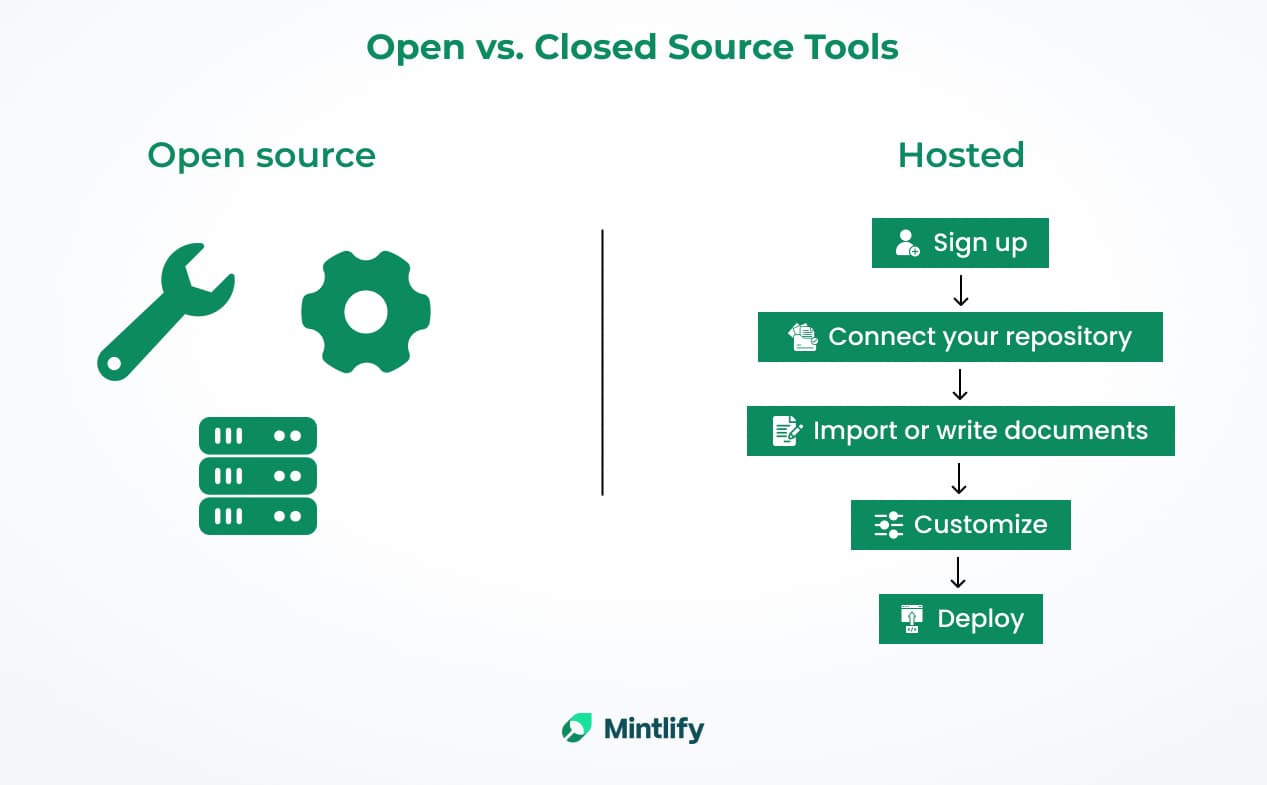
Comparison of how quickly documentation can be launched using open-source vs. hosted tools.
You don't need to manually configure your pipelines or servers, since hosting, themes, and CI/CD are provided by the vendor. Hosted platforms provide deployment (often including an SSL certificate), default branding options, and step-by-step guides to connect your content.
Open source documentation platforms are flexible by default, but you need to invest extra time and effort in setting them up and building project documentation.
Your team chooses the repository, deployment workflow, and hosting. A default theme and managed static host can keep the first setup small; custom components, search, and publishing requirements add work. Test with your own content rather than treating a starter-site launch as a migration estimate.
Customization and control
Open source platforms, such as Docusaurus and MkDocs, let you fully customize the codebase. You can build custom React components, edit CSS or HTML, add plugins, and restructure content as needed. They also support displaying code examples and documentation in multiple programming languages. To see what that flexibility costs in practice, read our Docusaurus comparison.
However, with open source platforms, you are responsible for maintaining the code. If you fork or heavily modify a software documentation framework because your tool lacks stable APIs or plugin ecosystems, you'll need to update those changes whenever new versions are released.
Hosted documentation tools come with polished defaults and configuration layers. They typically provide theme settings, color palettes, and some layout options, but you usually can't modify the underlying code.
This is convenient, but if your team needs a specific feature or layout that the platform doesn't support, you can't just code it yourself. Instead, you need to request it from the vendor or find a workaround.
Beyond customization, another major difference between open source and hosted platforms lies in how teams create and manage content.
Content creation and collaboration
When it comes to content creation, there are some questions you need to know the answers to in order to choose the right documentation tool.
For example, how many people from your team will write and maintain docs? Are they technical? Can they use Git comfortably? Do they need a visual editor?
Open source documentation tools are usually Markdown-first and rely on Git-based version control. Authors edit these files using code editors. This docs-as-code approach works well for developer-writers, but it can be challenging for non-technical writers when working on detailed documentation.
Out of the box, these tools often lack user-friendly features like WYSIWYG (What You See Is What You Get) editing, real-time collaboration, comment threads, and easy formatting.
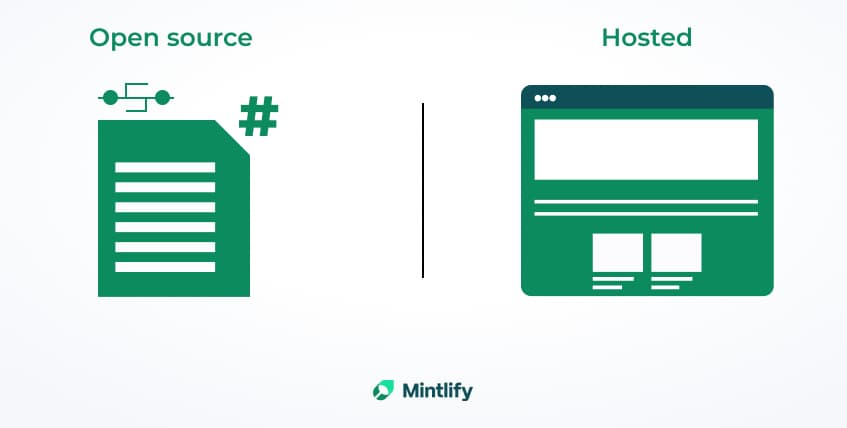
Open source documentation tools generally use pull requests and merge workflows for collaboration. Platforms like GitHub and GitLab provide features such as review comments on pull requests, which allow team members to discuss and suggest changes before merging.
The problem is that these collaboration features are tied to the pull request process and are not the same as real-time co-editing or threaded comments directly on documentation pages.
For non-developer teams, this workflow can feel restrictive. To achieve more interactive collaboration, non-developer teams often need to adopt additional tools or set up separate collaborative editing interfaces beyond what an open source platform can offer.
Mintlify supports Markdown authoring for developers, but also includes user-friendly features. For example, Mintlify offers a built-in WYSIWYG web editor with real-time co-editing, comments, and Google Docs-style suggestions for non-technical contributors.
This means a non-technical team member can tweak content in a familiar interface without touching Git or Markdown syntax. Mintlify also provides live preview deployments and AI suggestions.
Security and compliance
Open source documentation tools give you total control over data and compliance, but you own the risk.
Open source lets you keep everything in-house, which is better for some organizations. However, the documentation platform itself (such as MkDocs or Docusaurus) will also need to be updated and secured.
With open source platforms, you are in full control. The data, including your docs, can stay in the environments you manage yourself, which is important in highly-regulated industries that demand tight security measures and compliance with data regulations.
This means that you can efficiently enforce security policies, determine where your data is stored, and audit components.
With a vendor-hosted docs platform, the provider operates the service, while your team still decides who should access the content and configures those controls. Mintlify's Enterprise solution, for example, is SOC 2 Type II certified and uses industry-standard encryption at rest and in transit.
Review the provider's security evidence against your requirements rather than treating a vendor assurance as a replacement for access review. For example, Mintlify's authentication setup requires you to choose and configure an access method; existing public preview deployments also need attention when making a site private.
Mintlify supports Single Sign-On (SSO) and has built-in daily backups. The SSO support allows organizations to securely manage user access by integrating with identity providers (e.g., Google Workspace), while retaining centralized control over authentication and permissions. The built-in daily backups, meanwhile, automatically save content every day and retain it, which helps protect against data loss events.
The costs behind free documentation
Both open source frameworks and hosted documentation can have a zero-dollar software bill. The difference is which features you get and who maintains the infrastructure.
Compare the total cost of the configuration your team needs. Include setup and migration effort alongside any subscription, hosting, maintenance, and author-support costs. A free license does not remove that work, and a hosted subscription does not remove content ownership. Our roundup of free documentation software compares what each option includes at $0.
With open source, you're responsible for setup, theming, customization, ongoing maintenance, and fixing issues as they arise. You'll also need to handle your own hosting, whether that's configuring cloud infrastructure, paying for servers and bandwidth, or managing uptime and security.
For many teams, the time and effort required to self-manage their documentation infrastructure often outweigh the savings, making it a less efficient choice in practice.
Mintlify has two free paths. Its Free plan is available without an application, while eligible non-commercial open source projects can apply for Pro free forever through the OSS Program.
The OSS Program requires a recognized open source license, no venture backing or revenue funding, and no ownership or primary maintenance by a for-profit company. Approval gives the project a hosted Pro plan; Mintlify itself remains a proprietary platform. Our eligibility guide explains the requirements before you apply.
For an approved community project, compare the time spent maintaining a self-hosted stack with the work left after moving to managed hosting. If you need control over the platform's source code or must host it yourself, a free subscription does not replace those requirements.
Choose based on ownership
The right choice depends on your team's goals and capacity. Here are the key factors to consider before making the call.
- Customization needs: If deep customization is what you need and you have a team of front-end engineers capable of implementing and maintaining it, then it would probably be a good idea to go with an open source solution.
- Development bandwidth: Open source is a solid option if you have people on your team who can take ownership of maintaining and updating the documentation platform. If infrastructure work would take time away from other priorities, compare a managed documentation platform with an open-source generator on managed static hosting. Assign a maintainer and backup owner to the work that remains.
- Contributor preferences: If your team enjoys working in Markdown and Git, adopting an open source docs platform might be the logical choice. On the other hand, if your team members are used to a smoother, polished UI or WYSIWYG editing, a hosted tool is what you need.
- Compliance: If you have to self-host everything, open source lets you keep data in your environment. Otherwise, evaluate the provider's controls alongside your own access configuration, content exposure, and review responsibilities.
- Maintenance: With open source, you're responsible for keeping the software up to date, applying security patches, and handling any compatibility issues that arise. A hosted vendor maintains its platform, while your team still owns content, access configuration, and any custom integrations.
Choose open source if specific control requirements justify the upkeep and someone can own it. A managed static host may fit a Git-based team that wants to keep the generator but outsource hosting. A managed documentation platform may fit better when its publishing workflow removes work your team cannot sustainably maintain.
Before committing, try the same representative pages in each shortlisted setup. Have the people who will maintain them make and review a real change, then ask a new reader to find an answer. Include your hardest customization or access requirement. Record the work left to your team and the cost of the necessary plan; use that evidence to decide whether the managed workflow is worth the tradeoff.
Mintlify is a dev-native, but flexible documentation platform that handles hosting, security, and compliance.
With features like MDX-based customization, SOC 2 Type II compliance (with encryption and SSO), and automated deployments, Mintlify lets your team focus on writing and maintaining docs rather than spending time on infrastructure management and implementing security measures.
Apply for the OSS Program if your project meets the requirements. Otherwise, start on the Free plan. For the setup steps, follow our guide to publishing existing open source docs on Mintlify.
Related documentation guides
More to read
Mintlify vs. GitBook: which platform is better in 2026?
Mintlify vs GitBook for developer docs: design and performance, the editing experience, collaboration, content automations, and AI-native features.
April 7, 2025Tiffany Chen
Marketing
Best documentation platforms for open source projects in 2026
Compare Mintlify, Docusaurus, Read the Docs, Starlight, and VitePress for open source documentation, contributor workflows, and release maintenance.
November 13, 2026Harkirat Chahal
Growth

Free documentation for open source projects
Compare what open source projects get for $0 from Mintlify, Docusaurus, MkDocs, Starlight, VitePress, and Read the Docs, from hosting to search and AI.
October 26, 2026Harkirat Chahal
Growth
Mintlify's OSS Program: who qualifies and what you get
Non-commercial open source projects get Mintlify Pro free, forever. See what approved projects get, the three criteria to qualify, and how to apply.
October 26, 2026Harkirat Chahal
Growth
How to turn Markdown files into a docs website
Turn Markdown files into a docs website in seven steps, from structuring the repository to custom domains, preview deployments, and publishing on merge.
October 9, 2026Harkirat Chahal
Growth
Mintlify vs ReadMe for AI agents, speed, and pricing in 2026
Mintlify vs ReadMe, tested on ten live docs sites and 130 agent questions: agent search, page speed, self-updating docs, editing, API references, and pricing.
September 30, 2026Cole Gottdank
GTME